
LinkedIn Headshot AI Prompts: Studio Lighting Explained, Plus Two Prompts to Edit Your Own Selfie
- • Introduction
- • Read this first: an AI headshot must still look like you
- • Headshot lighting in plain words
- • Background separation and face distortion
- • Step-by-Step: How to Use These Prompts
- • Prompt 1: Executive Corporate Headshot with Soft Studio Rembrandt Lighting
- • Prompt 2: Modern Tech Founder in Minimalist Office Setting (Warm Bokeh)
- • Prompt 3: High-Key Commercial Studio Portrait with Crisp Neutral Lighting
- • Prompt 4: Creative Director Portrait with Architectural Concrete Backdrop
- • Prompt 5: Turn Your Own Photo into a Studio Headshot (Face Unchanged)
- • Prompt 6: Light-Touch Cleanup of Your Own Photo
- • From selfie to headshot: a careful workflow
- • Problems & Fixes
- • Pro Tips
- • Frequently Asked Questions
A good profile photo is mostly about light, background and framing, not an expensive camera. Those are exactly the things AI image tools can now adjust.
There is a catch that many prompt lists skip. A prompt that generates a new person gives you a stranger's face, which you cannot put on your profile. The useful route is to edit a photo of yourself while keeping your face exactly as it is.
So this guide starts with studio lighting terms in plain words. Then come four style prompts with samples, showing what each setup looks like, and two photo-edit prompts that apply a style to your own selfie without changing who you are.
Read this first: an AI headshot must still look like you
LinkedIn's help centre says your profile photo must reflect your likeness. It allows an illustration or artistic rendering of yourself, but lists other people's likenesses, including stock images, as photos it may remove. Prompts 1 to 4 below create fictional people, so treat them as style references only.
When you edit your own photo, keep the edit honest. Don't change your age, weight, skin tone or facial features, and don't use the image to look like someone you are not when applying for jobs. Some recruiters prefer real photos, and ID cards, exam forms and official documents need genuine, unedited photographs. Use AI headshots responsibly, keep your original, and be open about the edit if someone asks.
Headshot lighting in plain words
Photographers describe a light by where it sits and the shadow it leaves. Naming the pattern in a prompt works better than 'good lighting'. Fill light then controls how dark the shadow side gets: 'subtle fill' keeps some shape, 'no harsh shadows' gives the flat, bright high-key look.
- •Rembrandt lighting: the main light sits about 45 degrees to one side and a little above the eyes. The far cheek falls into shadow except a small triangle of light under the eye. It gives shape and a serious, confident feel.
- •Butterfly lighting: the light is in front of the face and above it, leaving a small butterfly-shaped shadow under the nose. It is even and flattering for cheekbones.
- •Clamshell lighting: butterfly lighting plus a second light or reflector below the face, like an open shell. It fills shadows under the eyes and chin for a soft, bright look.
- •Side lighting: one strong light from the side, with half the face in shadow. Dramatic, so it suits creative portfolios more than formal applications.
Background separation and face distortion
Profile photos are shown small and often cropped to a circle, so you need to stand out from the background. Tonal contrast does most of the work, such as a dark blazer against light grey; a soft light on the hair from behind or a blurred background adds more.
Face distortion comes from how close the camera is, not the lens itself. A selfie at arm's length makes the nose look larger and the ears smaller. Portrait photographers stand farther back and use longer lenses such as 85mm, which keeps features natural; in a prompt, '85mm' is shorthand for that perspective.
An AI edit that 'fixes' selfie distortion has to reshape your face, so start with a photo taken from a distance instead.
Step-by-Step: How to Use These Prompts
- 1For a photo you will actually use on LinkedIn or a CV, use Prompt 5 or 6 with your own photo. Use Prompts 1 to 4 only to explore styles.
- 2Take a good source photo: face a window in daylight, stand before a plain wall, and have someone shoot from about two metres away at eye level.
- 3In ChatGPT, tap the + button in the message box, choose 'Add photos & files' to attach your photo (PNG or JPEG), then paste the prompt.
- 4In Gemini, attach your photo and paste the prompt. Google's help page says image editing in Gemini is only available to users aged 18 or over.
- 5Compare the result with your original: eyes, nose, jaw, hairline, skin tone and glasses. If anything changed, reply 'Keep my face exactly as in the original photo; only change the background and clothing.'
- 6Download, crop square with your face centred, and check how it looks as a small circle before uploading.
Headshot Prompts: Four Style References and Two Selfie Edits
Copy a prompt, then use the button to open the tool it was written for.
Prompt 1: Executive Corporate Headshot with Soft Studio Rembrandt Lighting
Written for: Bing Image Creator / ChatGPT
A professional corporate studio headshot of an executive in their early 30s with a warm confident smile, looking directly at the camera. Wearing a well-tailored dark navy blue blazer with a crisp white dress shirt. Soft studio Rembrandt lighting with subtle fill light, smooth neutral grey seamless backdrop. Natural skin texture with authentic pores and fine lines, crisp eye catchlights, shot on a full-frame camera with 85mm f/1.8 lens, commercial business photography, 8k resolution.
Why this prompt works
'Soft studio Rembrandt lighting with subtle fill light' names both the light pattern and how dark the shadow side goes, giving the face shape without harsh shadow. 'Natural skin texture with authentic pores and fine lines' pushes against the waxy, airbrushed skin AI portraits often default to. '85mm f/1.8' asks for a natural perspective and a softly blurred grey backdrop.
Make it yours
- •Replace the blazer and shirt with 'a charcoal bandhgala jacket' or 'a plain silk saree with small earrings' to change the dress code.
- •Change 'neutral grey' to 'dark charcoal' for a moodier backdrop that suits senior or legal roles.
- •Swap 'Rembrandt lighting' for 'butterfly lighting' for a more even, frontal look.
Prompt 2: Modern Tech Founder in Minimalist Office Setting (Warm Bokeh)
Written for: Bing Image Creator / ChatGPT
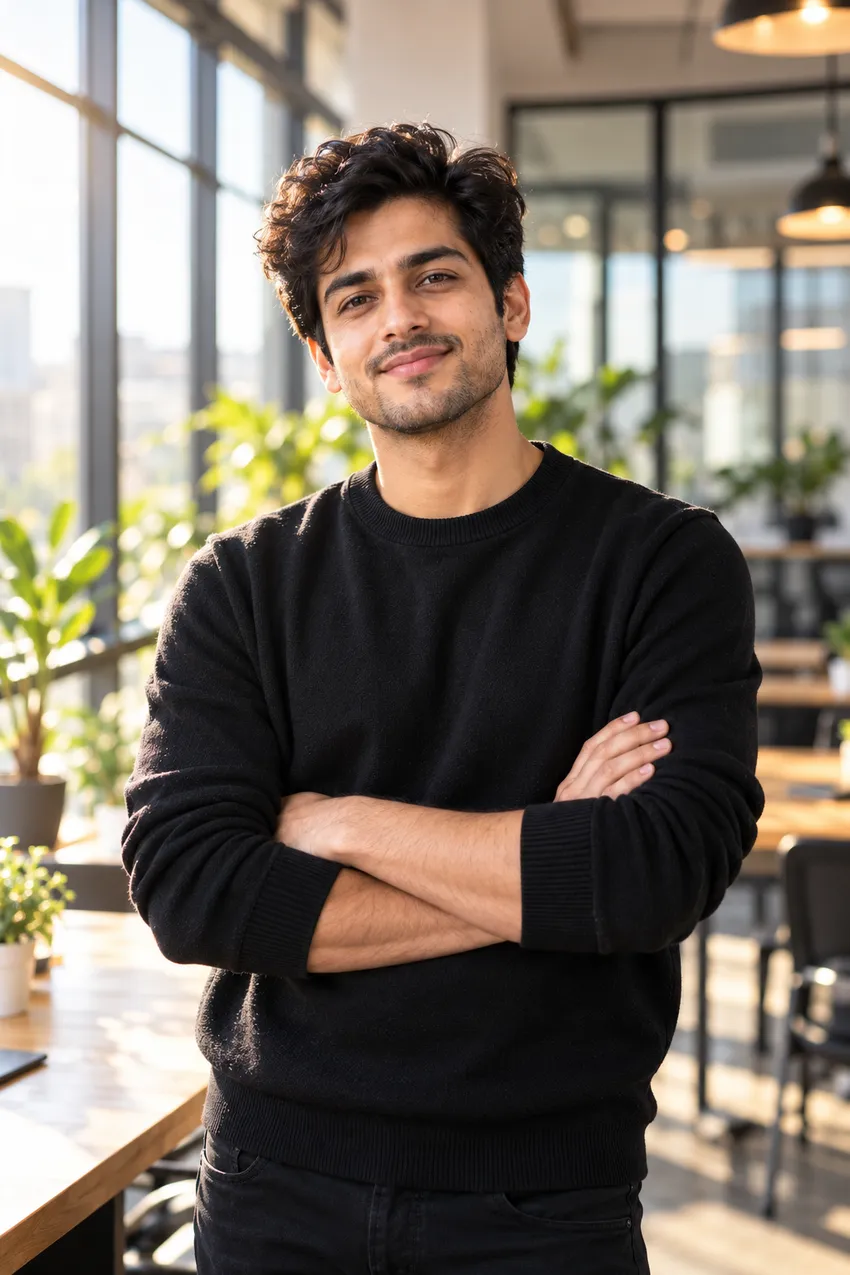
Professional candid portrait of an innovative tech startup founder standing confidently with arms crossed in a bright modern co-working office. Wearing a clean minimalist black crewneck sweater, approachable and friendly expression. Natural sunlight streaming through expansive floor-to-ceiling windows behind them, creating a gentle warm bokeh of architectural plants and glass partitions, 8k photorealistic portrait.
Why this prompt works
'Candid portrait' and 'approachable and friendly expression' relax the pose compared with a studio headshot. 'Sunlight streaming through floor-to-ceiling windows behind them' is backlight, which outlines the person and separates them from the office. 'Gentle warm bokeh' blurs the background so it reads as context, not clutter.
Make it yours
- •Replace 'arms crossed' with 'hands in pockets' or 'leaning on a desk' for a more open posture in client-facing roles.
- •Change 'co-working office' to 'clinic', 'classroom' or 'design studio' to match your profession.
- •Add 'soft fill light on the face' if the backlight leaves the face too dark.
Prompt 3: High-Key Commercial Studio Portrait with Crisp Neutral Lighting
Written for: Bing Image Creator
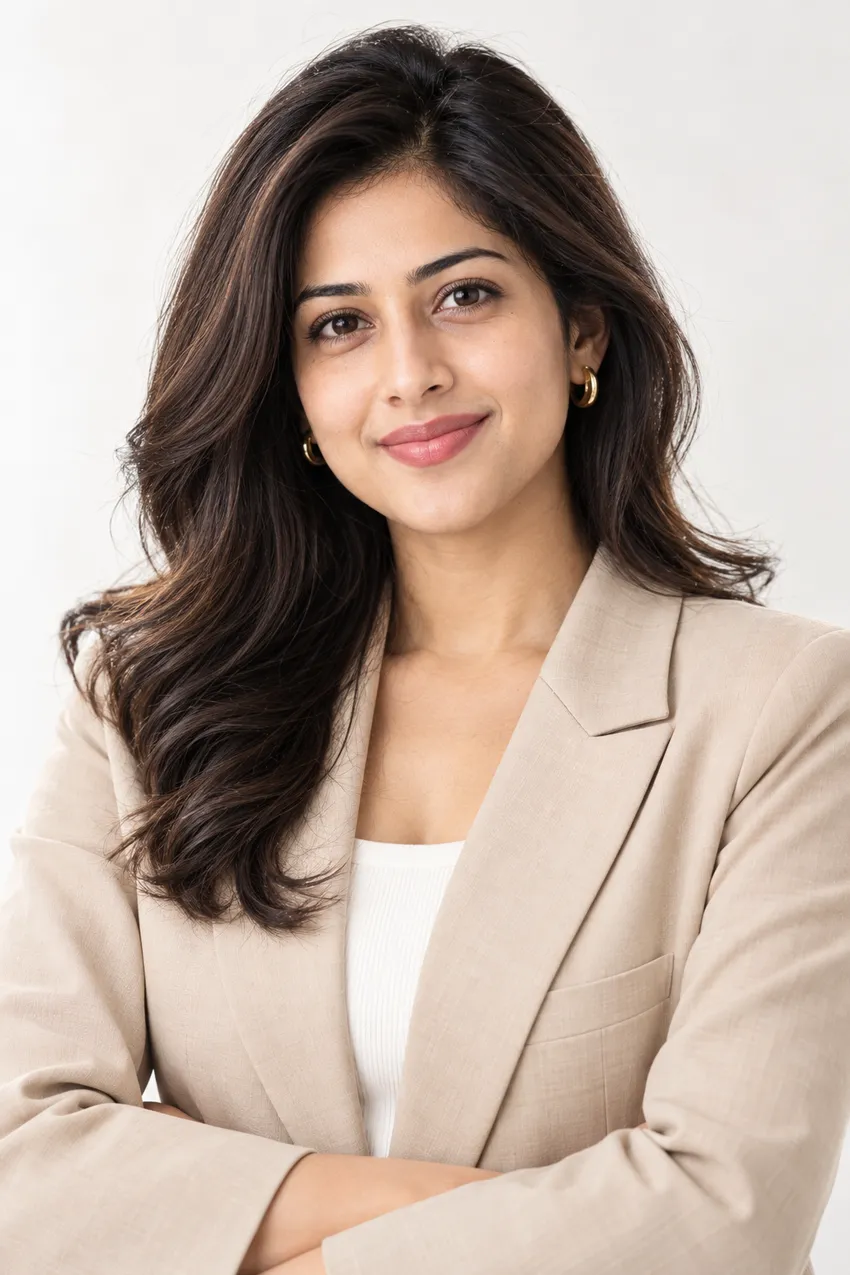
A clean high-key studio headshot of a professional businesswoman wearing an elegant beige tailored suit jacket. Perfectly styled hair, poised and articulate demeanor, soft dual softbox lighting eliminating harsh shadows. Clean pure off-white background, impeccable sharpness across facial features, high-end editorial business magazine photography style, 8k.
Why this prompt works
'High-key' means mostly bright tones with few shadows, and with 'clean pure off-white background' it gives the bright, even look common on company team pages. 'Soft dual softbox lighting eliminating harsh shadows' is close to clamshell lighting. 'Sharpness across facial features' asks for focus across the whole face, not just the eyes.
Make it yours
- •Replace 'businesswoman' and the suit with 'businessman in a navy suit' or 'woman in a maroon kurta with a Nehru jacket'.
- •Change 'pure off-white' to 'light blue-grey' if white feels clinical.
- •Replace 'perfectly styled hair' with 'natural, neatly tied hair' for a more everyday result.
Prompt 4: Creative Director Portrait with Architectural Concrete Backdrop
Written for: ChatGPT / Bing Image Creator
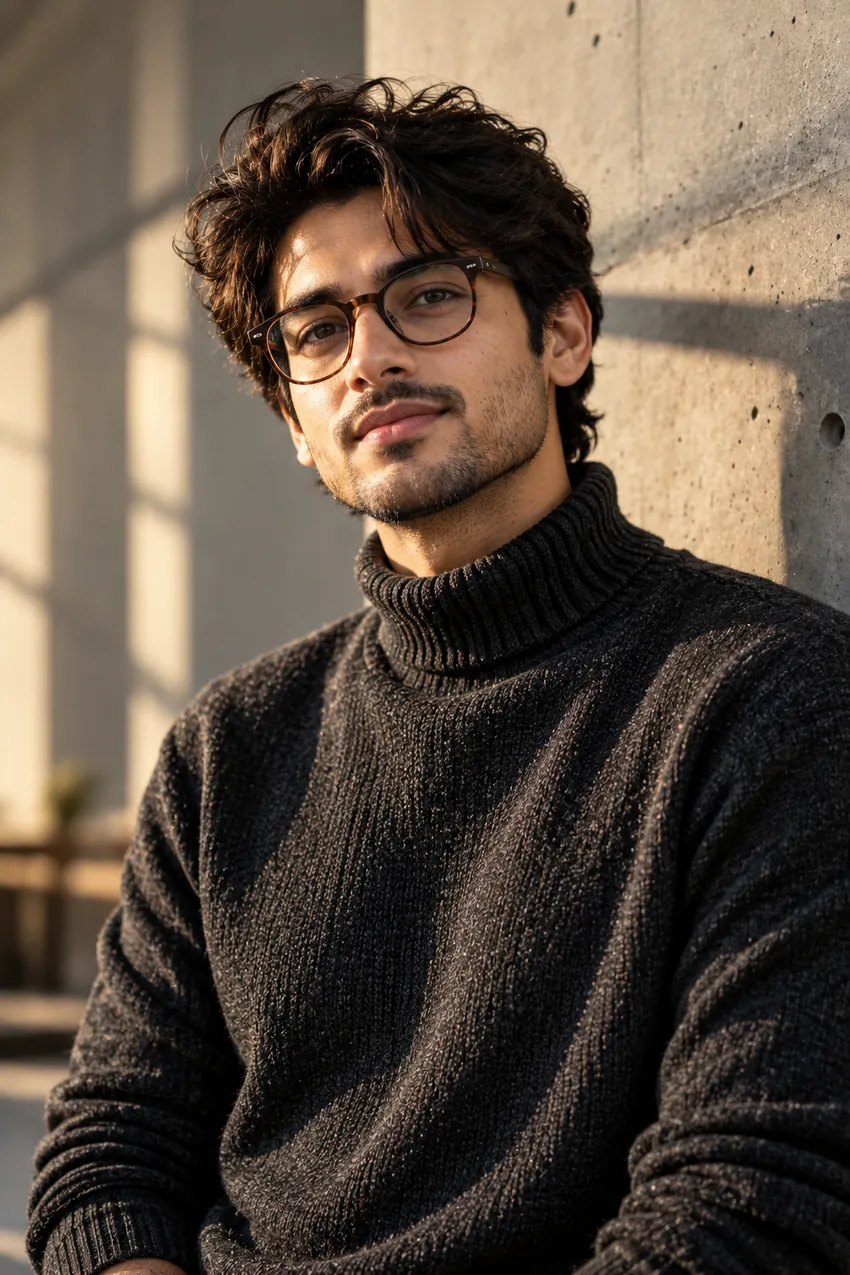
An artistic yet highly professional portrait of a creative director wearing stylish tortoiseshell glasses and a textured charcoal turtleneck sweater. Posed against a smooth architectural raw concrete wall with subtle architectural shadow lines. Warm directional side lighting highlighting jawline structure, authentic film tones, professional agency portfolio quality, 8k UHD.
Why this prompt works
'Warm directional side lighting highlighting jawline structure' is a side-light setup, so part of the face falls into shadow for a dramatic, portfolio feel. 'Raw concrete wall with subtle architectural shadow lines' adds texture without colour. 'Authentic film tones' softens contrast and warms the colours slightly.
Make it yours
- •Change 'side lighting' to 'softer side light with gentle fill' to keep the style but reduce drama.
- •Swap 'concrete wall' for 'exposed brick wall' for a warmer background.
- •Remove 'tortoiseshell glasses' unless you actually wear glasses; your headshot should match how you look day to day.
Prompt 5: Turn Your Own Photo into a Studio Headshot (Face Unchanged)
Written for: ChatGPT / Gemini · upload your own photo with this prompt
Using the photo I have uploaded, create a professional headshot of the same person. Keep the face exactly as it is: same face shape, eyes, nose, lips, jawline, skin tone, skin texture, age, hairline, facial hair, glasses and any marks or scars. Do not slim, smooth, lighten or beautify the face. Change only these things: replace the background with a smooth light grey studio backdrop, change the clothing to a well-fitted navy blazer over a plain white shirt, and relight the face with soft, even studio light from the front and slightly above. Frame it as a centred head-and-shoulders portrait with a little space above the head, as a square image. Photorealistic, natural colours.
Why this prompt works
A short 'keep my face' line is often not enough, so this prompt lists every feature that must stay the same. 'Do not slim, smooth, lighten or beautify' blocks the automatic beauty filter many tools apply. 'Change only these things' limits the edit to background, clothing and light.
Make it yours
- •Replace the clothing line with 'keep my clothing unchanged' if your own outfit is already suitable.
- •Change the backdrop to 'softly blurred modern office' for a less formal look.
- •Replace 'soft, even studio light from the front' with 'soft Rembrandt-style light from the left' for more shape.
Prompt 6: Light-Touch Cleanup of Your Own Photo
Written for: ChatGPT / Gemini · upload your own photo with this prompt
Keep this photo of me as it is, including my face, expression, skin tone, hair and clothing. Make only these small changes: replace the cluttered background with a softly blurred neutral office background, balance the lighting so both sides of my face are evenly lit without changing any facial features, and crop to a centred head-and-shoulders square. Do not change my face, age, body shape or skin colour, and do not add makeup or accessories. Keep it looking like a real, unedited photograph.
Why this prompt works
This is the safest option when your photo is already decent. 'Keep this photo of me as it is' sets the default to no change, and only three changes are named. 'Keep it looking like a real, unedited photograph' steers away from the glossy, over-processed look.
Make it yours
- •Replace 'neutral office background' with 'plain light grey wall' for a more formal result.
- •Delete the lighting line if your photo is already evenly lit, so the tool has even less reason to touch your face.
- •Add 'remove the shadow of the phone on my shirt' or a similar small fix, one per request.
From selfie to headshot: a careful workflow
The source photo decides most of the result. Wear a solid colour without small patterns, keep your head level, and don't apply beauty filters before uploading.
Run Prompt 6 first if your photo is decent, and Prompt 5 if you need a new background and outfit. If your face drifts, say so directly ('the nose and jaw changed; restore them exactly from the original'). If it keeps drifting, start a new chat with the original rather than editing an edited copy.
- •Upload only photos of yourself, or of someone who has agreed
- •Keep the unedited original for official uses
Problems & Fixes
| Problem | Fix |
|---|---|
| The result no longer looks like you. | Use Prompt 5's full feature list, start a fresh chat, and upload a clear, front-facing photo taken from a distance. Ask for one change per message instead of several at once. |
| Your skin looks lighter or smoother than in real life. | Add 'keep my exact skin tone and texture from the original photo; do not lighten or smooth the skin'. Compare both images side by side before downloading. |
| The new blazer looks pasted on or the collar is wrong. | Ask for simpler clothing such as 'plain navy blazer, plain white shirt, no tie', or keep your own clothing and change only the background. |
| The tool won't edit your photo. | Check the tool's rules: Gemini limits image editing to users 18 and over, and features vary by country and account type. In ChatGPT, use a PNG or JPEG file and try a smaller image. |
Pro Tips
- •Judge your headshot at thumbnail size. If your face isn't clear in a small circle, crop tighter or choose a plainer background.
- •Keep glasses, beard or bindi in the edit if you wear them every day; people should recognise you when they meet you.
- •Use the same photo across your professional profiles so people can connect them to you.
Frequently Asked Questions
Can I use an AI headshot on LinkedIn?
LinkedIn says your profile photo must reflect your likeness, and it allows artistic renderings of yourself. An honest AI edit of your own photo fits that; a generated stranger from Prompts 1 to 4 does not. Some recruiters still prefer real photos, so keep a genuine one ready.
Why does the AI change my face slightly even when I tell it not to?
Image tools often redraw the whole picture rather than editing pixels in place, so small changes creep in. Listing each feature to keep, asking for one change at a time and starting from the original photo all reduce the drift.
Is an AI headshot as good as a photographer?
A photographer gives you a real photo with real light, which some employers and industries expect. An AI edit is a low-cost way to fix the background, outfit and light of a photo you already have.
Is it safe to upload my photo to ChatGPT or Gemini?
Read each tool's privacy and data settings before uploading, and upload only your own photos or photos of people who agreed. If unsure, use a photo you would already be happy to post publicly.
Sample images on this page are AI-generated. AI tools change often, so results can differ from the samples. See our editorial & AI policy for how guides are written and corrected.